How Houndarr Works
Houndarr is a search scheduler for Radarr, Sonarr, Lidarr, Readarr, and Whisparr (v2 and v3). It triggers search commands in small, rate-limited batches so you don't have to hit "Search All Missing" and overwhelm your indexers.
It does not download anything, parse releases, or evaluate quality. Your *arr instances do all the actual searching and result evaluation. Houndarr only decides when to ask them to search and how many items per batch.
The search cycle
Each cycle asks the *arr instance for missing, cutoff-unmet, or upgrade-eligible items, reads back the wanted list of monitored items, applies scheduling rules (optional tag filter, cooldown, hot retry, hourly cap, post-release grace, items already in the download queue, batch size), sends a search command for each eligible item, and logs the rest as skipped for retry next cycle. Your *arr instances do all the actual searching. Houndarr controls the pacing.
Monitored vs. wanted
A monitored item in your *arr instance just means the software is tracking it. If the item is already downloaded at a quality that meets your cutoff, it won't appear in any wanted list, and Houndarr will never touch it.
| Item state | Will Houndarr search it? |
|---|---|
| Monitored + missing | Yes, if eligible under scheduling rules |
| Monitored + downloaded + cutoff met | No (unless upgrade search is enabled for the instance) |
| Monitored + downloaded + cutoff unmet | Yes (if cutoff search is enabled), if eligible |
| Not monitored | No. Houndarr only reads monitored wanted lists. |
Who decides "cutoff unmet"?
Your *arr instance, not Houndarr. It populates the wanted/cutoff API list based on your quality profile settings. Houndarr reads that list and applies its scheduling rules on top.
If cutoff searches aren't happening, check whether the item actually appears in your instance's own "Wanted > Cutoff Unmet" view first.
Houndarr works best when your *arr instances are already configured with quality profiles you trust. It does not manage quality profiles or custom formats.
If you want to build, test, and deploy quality profiles and custom formats across your stack, Profilarr is a community tool built for that. It connects to curated databases like TRaSH Guides, lets you test custom format conditions before deploying, and pushes configurations to any number of instances. It is optional and fully independent of Houndarr.
Why only a few items get searched each cycle
Think of it as a funnel: your monitored library narrows to the wanted list (the *arr filter keeps only missing, cutoff-unmet, or upgrade-eligible items), then narrows again to what's eligible this cycle (the Houndarr filter applies tag filter, cooldown, hot retry, post-release grace, hourly cap, and the download queue check), and finally to what's actually searched (capped by batch size, often just 1 to 3 items).
For example, if you have 500 monitored movies in Radarr but only 50 are cutoff-unmet, and 35 of those are on cooldown, 8 are still in their post-release grace window, and your batch is 1, Houndarr searches 1 movie that cycle. The rest wait for cooldowns to expire or grace windows to pass, and Houndarr works through them over days and weeks. Missing items that were blocked only by release timing get one early retry by default; when Hot Retry Window is enabled, they can retry on the configured interval until that window closes.
The three search passes
Each enabled instance can run up to three independent passes:
| Pass | What it searches | Key controls |
|---|---|---|
| Missing | Items from the instance's wanted/missing list | Batch size, sleep interval, hourly cap, cooldown, post-release grace, hot retry |
| Cutoff | Items from the instance's wanted/cutoff list | Cutoff batch, cutoff cap, cutoff cooldown |
| Upgrade | Library items that already have files and meet cutoff | Upgrade batch (hard cap: 5), upgrade cap (hard cap: 5), upgrade cooldown (min 7 days) |
Cutoff search is off by default. Enable it only after missing items are under control so the two passes don't compete for the same indexer budget.
Upgrade search is also off by default and much more conservative. It re-searches items that your *arr instance already considers complete, letting the instance find better releases based on quality profiles and custom format scoring. Enable it only after both missing and cutoff backlogs are stable.
If a missing item was skipped because it was not yet released or still inside
post-release grace (Nh), Houndarr allows one retry as soon as that release-timing
gate clears instead of waiting for the full missing cooldown. If Hot Retry Window
is enabled, the latest post-release grace (Nh) skip can keep the item on a
short retry interval until the window closes. An item that never got a search
inside that window still takes its one retry afterwards. Cutoff keeps its normal
cooldown behavior.
What "skipped" means in the logs
An item Houndarr considers but does not search generally gets an
action=skipped log row with a reason string. Some reasons write at
most one row per item per day rather than one per cycle, and in season,
artist and author mode a row another item already accounted for is
left out. The
canonical list of reasons and their meanings lives in
Skip Reasons.
A high skip count with zero errors is pacing working as designed: the engine examines candidates, finds most ineligible under your rules, and waits for the next cycle.
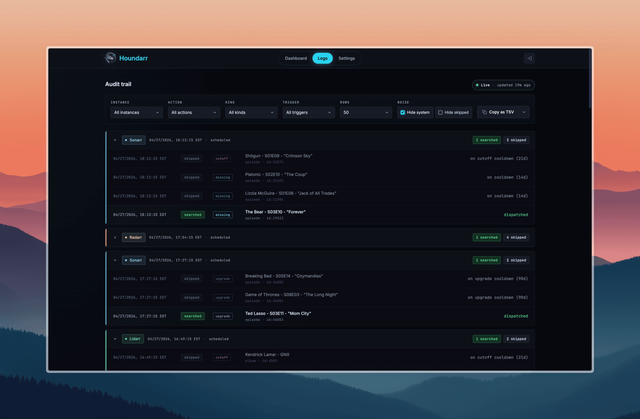
On mobile, log entries are presented as stacked cards; each card corresponds to one cycle group or individual row:
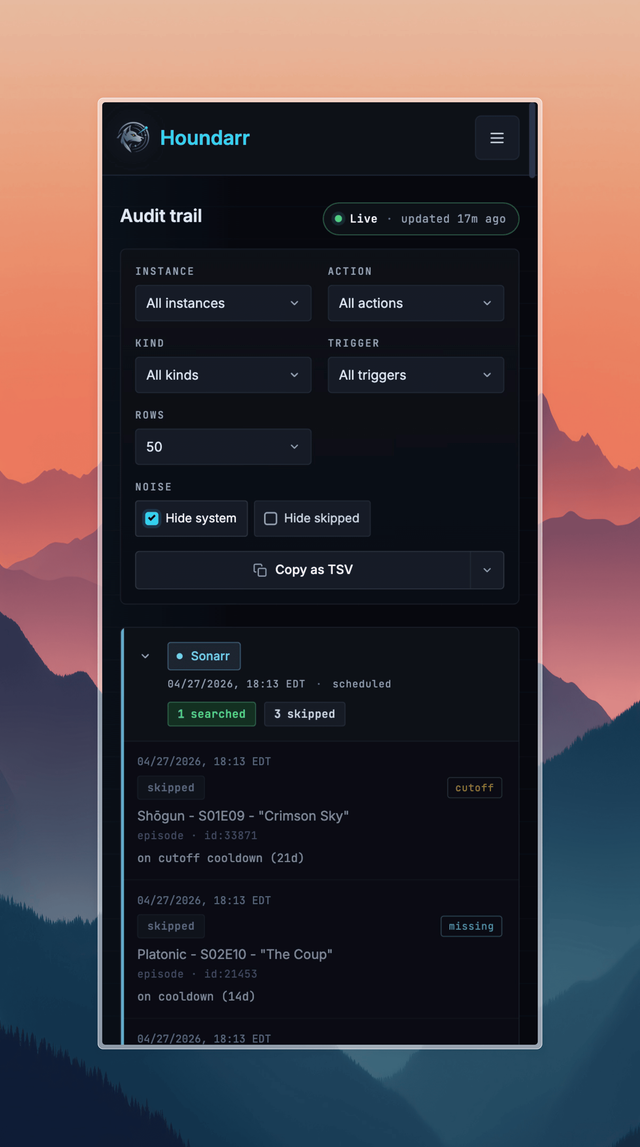
The Logs page on a phone-width viewport: the same filter controls as desktop, then cycle cards stacked underneath.
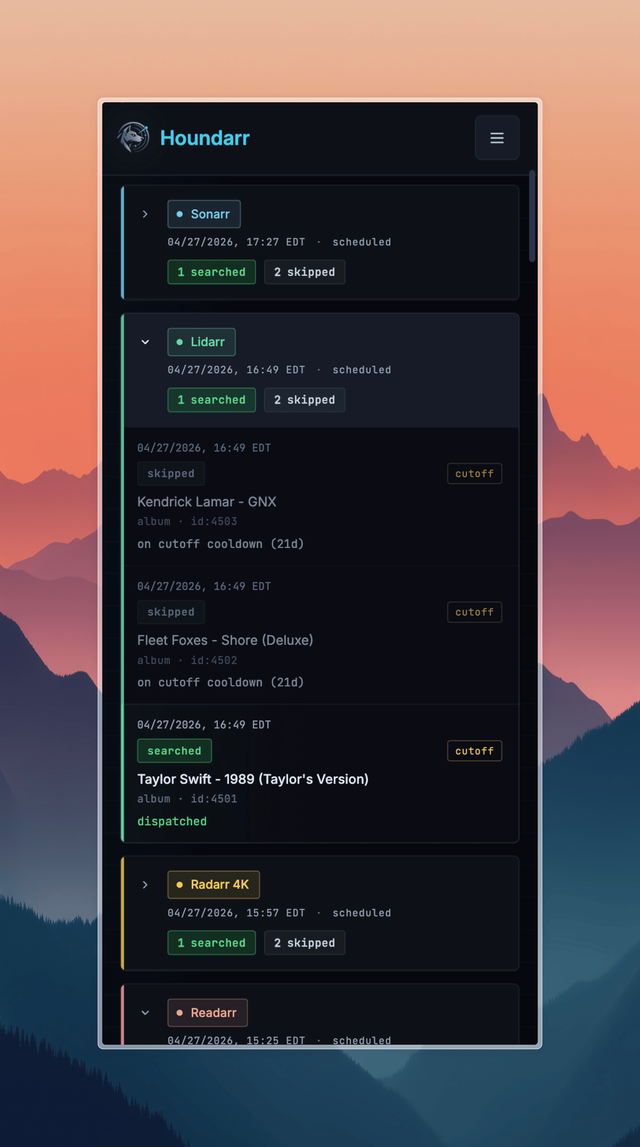
Each cycle card expands inline to show its individual searched and skipped rows.
See FAQ for answers to specific questions, and Verify It's Working to confirm everything is connected and running.