Admin actions
The Settings page groups every global administrative action inside the Admin collapsible. Five sub-sections: Security, API key, Updates, Maintenance, Danger zone.
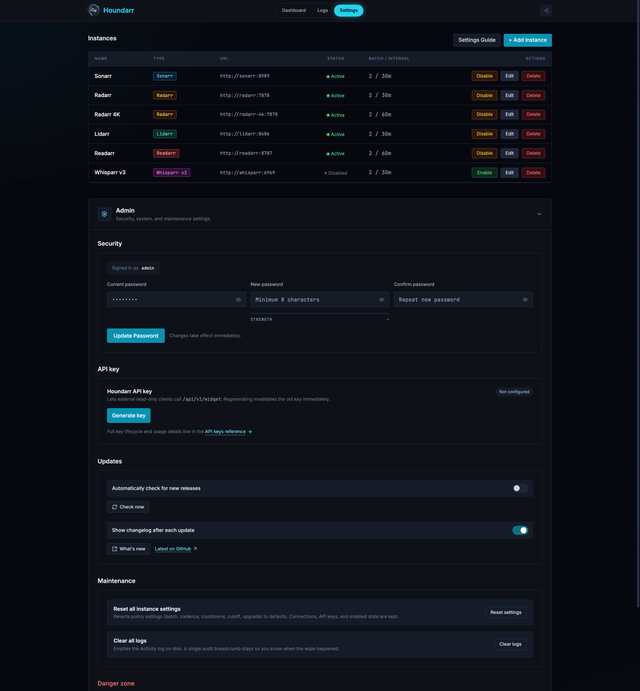
Everything below works the same under built-in auth and proxy / SSO auth, with two exceptions noted inline.
Security
Change the local admin password. The form uses the same show/hide
toggle, caps-lock indicator, strength meter, and confirm-password
match indicator you see on the /login and /setup pages, because
they share one module.
On success, the tab reloads. That is deliberate: the session signing secret is rotated at the same time the password is written, which invalidates every cookie signed with the old secret (other tabs, other devices, a session you suspect was copied). The tab that made the change is reissued a fresh cookie before the reload so it stays signed in without any action from you.
The current-password check shares the same IP-scoped bucket as
/login. Five wrong entries in a minute return HTTP 429 until the
window rolls off, so a session-compromised attacker cannot
brute-force the current password through this form.
Behavior in proxy / SSO mode: the password form is hidden. Instead you
see a read-only "Signed in as <username>" card that echoes whatever
username your upstream proxy forwarded on the request. Credential
rotation is handled at the proxy layer (Authelia, Authentik,
oauth2-proxy, or whatever you're using); see SSO / proxy
auth.
API key
Generate, rotate, or revoke the Houndarr API key used by external
read-only clients. Homepage uses this key to call /api/v1/widget
through the X-Api-Key header.
- Generate key creates the active Houndarr API key and shows the plaintext once. Copy it before closing the dialog.
- Regenerate key creates a replacement and invalidates the old key on the next request. Update external clients after copying the new value.
- Revoke deletes the active key.
/api/v1/widgetreturns HTTP 401 until a new key is generated. - Last used updates after a successful widget request and shows
Neverbefore first use.
The API key lane works the same in built-in auth and proxy / SSO mode.
A browser session or proxy-auth header alone does not authorize
/api/v1/widget; the request must include the Houndarr API key.
See API keys, Widget API, and Homepage Integration for setup and endpoint details.
Updates
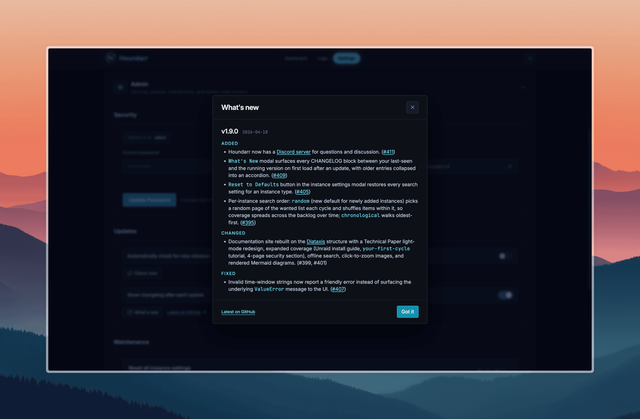
Controls for the release check and the What's new modal:
- Automatically check for new releases toggle. When enabled, Houndarr polls GitHub Releases once every 24 hours for the latest stable tag. The result renders inline under the toggle. Off on every install, so nothing reaches GitHub until you flip it on.
- Check now button. Forces an immediate poll regardless of the toggle state. Useful for one-off checks without enabling the background poll.
- Show changelog after each update toggle. When enabled, the What's new modal opens automatically the first time you load the Settings or Dashboard page after a version bump. When disabled, the modal stays silent and the last-seen version is silently advanced on every load so re-enabling later does not surface a backlog.
- What's new button. Opens the modal on demand, useful when you want to re-read what shipped without waiting for the next release.
- Latest on GitHub ↗ link. Opens
CHANGELOG.mdon GitHub so the remote view is always one click away, independent of the image version you are on.
Maintenance
Two neutral actions. Both pop a confirmation dialog before firing; no typed phrase required.
Reset all instance settings
Reverts every instance's policy columns to defaults:
- Cadence (batch size, sleep interval, hourly cap, cooldown days)
- Post-release grace, hot retry, and queue backpressure limits
- Cutoff search settings (enabled / batch / cooldown / cap)
- Upgrade search settings (enabled / batch / cooldown / cap)
- Per-app search modes (Sonarr / Lidarr / Readarr / Whisparr v2)
- Allowed search window and search order
- Pagination cursors (missing, cutoff) and upgrade-pool offsets
Identity stays put: each instance keeps its name, type, URL, encrypted API key, enabled flag, timestamps, and the monitored/unreleased snapshot counts that feed the Dashboard.
Nothing else is touched. Cooldown rows and the search_log table are
left alone so an accidental click does not flood your indexers on the
next cycle.
A single info row is written to the Activity log so you can tell when the reset happened.
Clear all logs
Empties the search_log table (what the Activity log page displays).
A single breadcrumb row is inserted immediately after the truncate
("Audit log cleared by admin (N rows removed)") so the wipe is itself
visible. Cooldowns, settings, and instances are not touched.
Danger zone
Factory reset Houndarr
Returns Houndarr to its first-run state. Specifically:
- The background supervisor is stopped.
houndarr.db(plus-waland-shm), and the master-key file, are deleted from the data directory.- A fresh empty schema is initialised, a new master key is generated, and the in-memory auth caches are cleared.
- A fresh supervisor is started (with zero instances, so no cycles).
You are redirected to the setup page (built-in auth) or the dashboard
(proxy auth, since /setup is not reachable in that mode).
The confirmation flow demands two factors:
| Mode | Factor 1 | Factor 2 |
|---|---|---|
| Built-in | Type RESET | Current admin password |
| Proxy / SSO | Type RESET | Type your proxy username (echoed from the auth header) |
In built-in mode the password check shares the IP-scoped bucket used
by /login. Five wrong entries in a minute lock the form out with
HTTP 429 until the window clears, so a stolen session cookie cannot
be used to brute-force its way into a destructive action.
A failure during the in-process re-init (extremely rare) exits the container so your orchestrator can restart it. The database and master key are already deleted at that point, so on boot the empty data directory triggers the normal first-run flow.
Because the database is wiped, the only audit trail for a factory reset is the stderr log entry (includes the username and the request IP). Save those container logs if you need the history later.
If you just wanted a fresh start
If you want defaults without losing the data:
- Use Reset all instance settings to wipe only the policy configuration (keeps your connections and history).
- Use Clear all logs to only empty the Activity log.
- Reach for Factory reset only when you want the on-disk database and master key gone.
See Instance settings for the field-by-field defaults that a policy reset restores to.