Homepage Integration
Use Homepage's customapi widget when you want Houndarr on the same
dashboard as the rest of your stack. The widget reads Houndarr's
key-gated /api/v1/widget endpoint and displays the same library-health
rollup that the Houndarr dashboard uses.

Before you start
| Requirement | Why it matters |
|---|---|
| Houndarr is running with at least one configured instance | The widget reads the current Houndarr dashboard totals. |
| Homepage can reach Houndarr from its server or container | widget.url is fetched by Homepage, not by your browser. |
You can edit Homepage services.yaml | The widget is configured in the service block. |
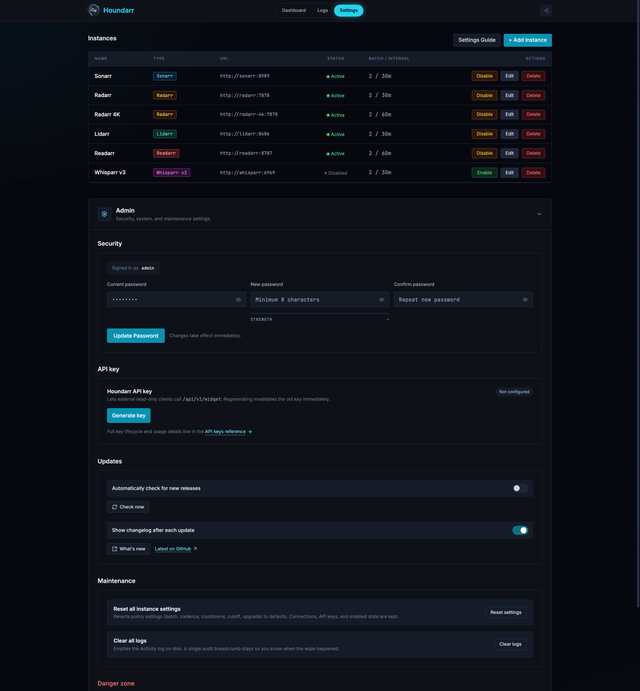
You can open Settings > Admin > API key in Houndarr | The widget needs a Houndarr API key in the X-Api-Key header. |
Generate the Houndarr API key
Open Settings > Admin > API key, then select Generate key. Houndarr shows the plaintext key once. Copy it before closing the dialog.
Houndarr stores only a SHA-256 hash of the Houndarr API key. If you lose the plaintext value, regenerate it and update Homepage.
Add Houndarr to services.yaml
Add a service entry like this. Replace the URLs and the placeholder key with values from your deployment.
- Media:
    - Houndarr:
        icon: https://av1155.github.io/houndarr/img/houndarr-logo-dark.png
        href: http://houndarr:8877
        description: Polite media search scheduler
        widget:
          type: customapi
          url: http://houndarr:8877/api/v1/widget
          method: GET
          refreshInterval: 30000
          headers:
            X-Api-Key: hndarr_xxxxxxxxxxxxxxxxxxxxxxxxxx
          mappings:
            - { field: totals.eligible, label: Eligible, format: number }
            - { field: totals.gated, label: Gated, format: number }
            - { field: totals.unreleased, label: Unreleased, format: number }
            - { field: totals.searches_7d, label: Searches, format: number }
| Setting | Value |
|---|---|
href | The browser link Homepage opens when you select the service. Use the URL you normally use for Houndarr. |
widget.url | The URL the Homepage server or container can reach. In Docker, this is often http://houndarr:8877/api/v1/widget. |
headers.X-Api-Key | The Houndarr API key copied from Settings > Admin > API key. |
refreshInterval | 30000 asks Homepage to refresh every 30 seconds. |
mappings | The four fields shown in Homepage's compact service card. |
Restart or reload Homepage after saving services.yaml.
When Homepage ships a first-class widget
If Homepage adds an official houndarr widget type, keep the same
Houndarr API key and endpoint. Follow the Homepage widget docs for the
new block shape, and use this guide for the Houndarr-side key lifecycle
and network checks.
Until that widget is available in your Homepage release, use
customapi.
Test the endpoint from the Homepage network
Run the same request from the host or container network where Homepage runs:
curl -i \
  -H 'X-Api-Key: hndarr_xxxxxxxxxxxxxxxxxxxxxxxxxx' \
  http://houndarr:8877/api/v1/widget
A working response returns HTTP 200 and a JSON body with schema,
generated_at, and totals. Endpoint fields and error responses are
listed in the Widget API reference.
Troubleshooting
| Symptom | Check |
|---|---|
| Homepage shows a connection error | Make sure widget.url is reachable from the Homepage server or container. The browser-facing href can use a different host. |
The curl test returns 401 | The X-Api-Key header is missing, invalid, regenerated, or revoked. Use the saved current key or generate a new one. |
The curl test returns 429 | Too many failed key attempts came from the same client IP. Wait 60 seconds and retry with the current key. |
| Totals are zero | Confirm Houndarr has enabled, healthy instances and that its dashboard shows library data. |
Proxy auth mode
/api/v1/widget uses the Houndarr API key in both built-in auth and
proxy auth modes. Homepage does not need a browser session, proxy-auth
header, or CSRF token. It only needs the X-Api-Key header.
See API keys for the key lifecycle and SSO Proxy Auth for the proxy-mode trust model.