Install on Unraid
Since 2026-03-30, Houndarr has lived in the Unraid Community Applications (CA) store. On Unraid, the CA plugin is the fastest install path. You do not need to write Docker Compose by hand.
Prerequisites
- Unraid 6.9 or later with the Community Applications plugin installed
- Docker service enabled (default)
- At least one Radarr, Sonarr, Lidarr, Readarr, or Whisparr instance reachable from your Unraid server
Install via Community Applications
- Open the Apps tab in the Unraid web UI.
- Search for Houndarr.
- Click the Houndarr tile to see its details.
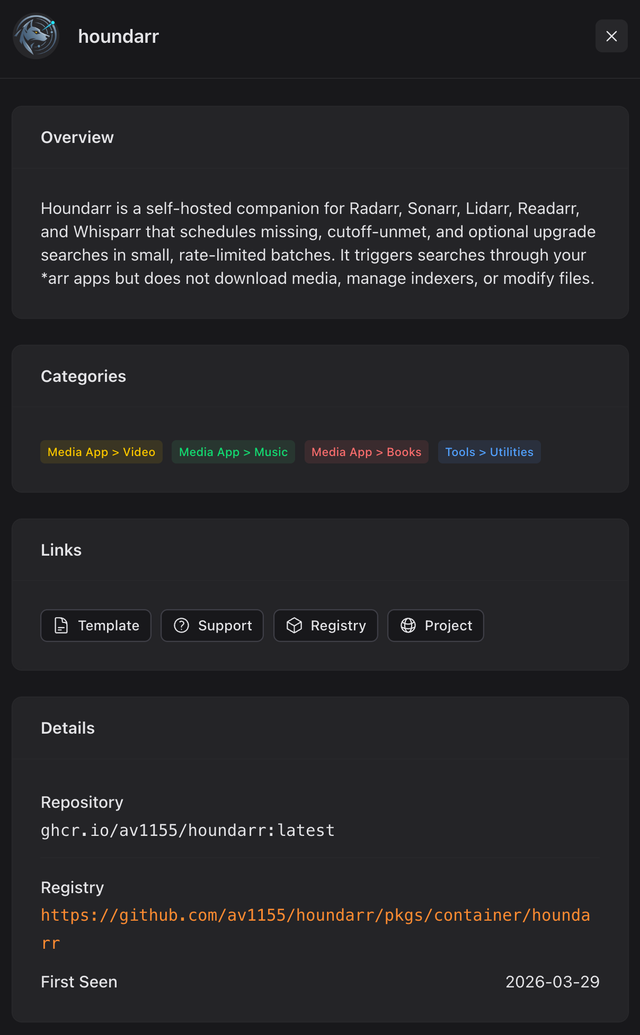
The CA detail popup you see after clicking the Houndarr tile. Click Install to open the template editor.
- Click Install. The template editor opens with nine fields; they are covered below.
Template fields
The CA template exposes nine fields in this order. The defaults match what Houndarr expects; only the timezone and appdata path typically need thought.
Web UI Port
Default: 8877. The port Houndarr's web interface listens on.
Change this only if another container on your server already binds
8877.
Data Directory
Default: /mnt/user/appdata/houndarr. This is the Unraid appdata
convention and maps to /data inside the container. The directory
holds two files:
houndarr.db: the SQLite database (settings, encrypted API keys, search log)houndarr.masterkey: the Fernet key that decrypts your stored *arr API keys
Lose houndarr.masterkey and every stored *arr API key becomes
unrecoverable. You will have to re-enter each key by hand. Back up
the whole /mnt/user/appdata/houndarr path with whatever tool you
already use for appdata (CA Backup, rsync, Duplicati).
Timezone (TZ)
Default: UTC. Set this to your local timezone (for example
America/New_York, Europe/London). It is read by
Allowed search window;
times on the Logs page follow your browser instead. The
IANA tz list
has every valid value.
PUID / PGID
Defaults: PUID=99, PGID=100. These are Unraid's nobody user
and users group, which own the files under /mnt/user/appdata/
out of the box.
The defaults differ from the generic Docker convention (1000:1000).
On Unraid, keep them at 99 / 100 unless you run appdata under a
different account. Other docs you read about Houndarr (Docker
Compose, Kubernetes) will use 1000:1000; that is correct for those
environments and wrong for Unraid.
Secure Cookies (HOUNDARR_SECURE_COOKIES)
Default: false. Flip to true when you put Houndarr behind a
reverse proxy with HTTPS termination (SWAG, Nginx Proxy Manager,
Traefik). Leaving it false is correct for plain-HTTP LAN access.
Trusted Proxies (HOUNDARR_TRUSTED_PROXIES)
Default: empty. When Houndarr sits behind a reverse proxy, set this
to the proxy container's IP, or to the Docker network's CIDR such as
172.17.0.0/16, so the login rate limiter sees real client IPs via
X-Forwarded-For. Leaving empty is correct when no proxy is in
front.
Auth Mode (HOUNDARR_AUTH_MODE)
Default: builtin. Houndarr uses its own login page and session
cookies. Leave as builtin unless you route Houndarr through
Authentik, Authelia, or oauth2-proxy; in that case switch to
proxy.
Auth Proxy Header (HOUNDARR_AUTH_PROXY_HEADER)
Default: empty. Required only when Auth Mode is proxy. Set to
the HTTP header your SSO provider injects with the authenticated
username (for example Remote-User for Authelia,
X-authentik-username for Authentik).
Log Retention Days (HOUNDARR_LOG_RETENTION_DAYS)
Default: 30. Houndarr deletes search log entries older than this
once a day during the periodic retention sweep. Lower it to 7 or
14 if your dashboard feels slow on a long-running instance with
several active *arrs; raise it (up to 365) if you want a longer
audit trail. Set to 0 to disable automatic purges entirely; the
manual Clear logs button under Settings > Admin still works.
First launch
Apply the template. The container pulls and starts. Then:
- Open
http://<your-unraid-ip>:8877in a browser. - Follow First-Run Setup to create your admin account and add instances.
Defaults are conservative on purpose
Houndarr ships with batch size 2, hourly cap 4, and a 14-day cooldown per item. That clears roughly 4 to 8 searches per day per instance: slow on purpose.
Unraid users run many media apps on one server. If you crank batch size, hourly cap, or cooldown aggressively to chew through a large backlog, your *arr instances will flood the same indexers your existing grabs depend on, and the indexers hand out rate limits and bans fast. Tune up one knob at a time, watch the Logs page for a full day, and only push further when indexer health stays clean. The full tuning order is in Increase Throughput.
Adding env vars that are not in the template
The template covers the nine fields most users need. Two others are useful for specific cases:
HOUNDARR_COOKIE_SAMESITE: defaults tolax. Set tostrictfor the most restrictive cookie policy; breaks access from dashboard apps like Homarr that click through to Houndarr.HOUNDARR_LOG_LEVEL: defaults toinfo. Set todebugwhen working through a support thread.
To add either, scroll to the bottom of the template editor, click Add another Path, Port, Variable, Label or Device, choose type Variable, set the key and value, and apply.
Support
- Unraid support thread: https://forums.unraid.net/topic/197870-support-houndarr/
- GitHub issues: https://github.com/av1155/houndarr/issues