Instance Settings
Per-instance configuration for the search engine. Each field is documented with default, range where applicable, and behavior.
For the Search Order explanation (Random vs Chronological) see Search Order. For tuning guidance see Increase Throughput. For the per-app API command Houndarr sends see Search Commands.
:::tip Want to start fresh? If you want every instance back to default policy without losing the instances themselves, use Settings > Admin > Maintenance > Reset all instance settings. It reverts every field below at once but keeps your connection details and API keys. See Admin actions for the full list of what a reset touches. :::
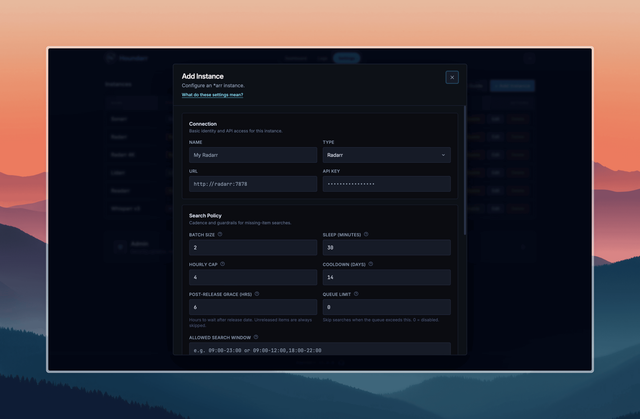
The same form opens when you click Edit on an existing row, with the current values pre-populated. The API key stays masked until you overwrite it.
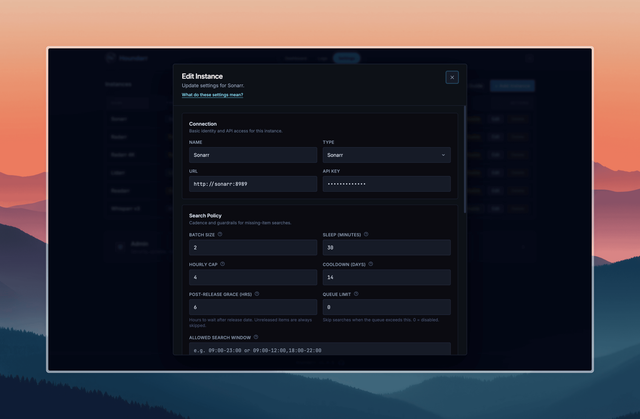
Missing search controls
Batch Size
Maximum number of missing items considered per cycle.
- Default:
2 - Lower values are safer; higher values clear backlog faster.
Sleep (minutes)
Wait time between cycles for each enabled instance.
- Default:
30 - Lower values increase request frequency.
Hourly Cap
Maximum successful missing searches per hour.
- Default:
4 - Set
0to disable this cap (not recommended unless you trust upstream limits).
Cooldown (days)
Minimum days before retrying the same missing item.
- Default:
14 - Larger values reduce repeat search noise.
- Release-aware retry applies to the missing pass only. See Skip Reasons.
Post-Release Grace (hours)
Hours to wait after an item's release date before searching.
- Default:
6 - Items inside this window log as
post-release grace (Nh)and skip. - Items with a release date in the future log as
not yet releasedregardless of this setting. An item with no release date counts as released.
Hot Retry Window (hours)
Optional hours after post-release grace when a missing item can retry on a short interval before the normal missing cooldown takes over.
- Default:
0(disabled) - The latest
post-release grace (Nh)skip opens the window. - Hot retries still count against Batch Size and Hourly Cap.
Hot Retry Interval (hours)
Minimum hours between hot retry attempts while the hot retry window is active.
- Default:
2 - Must be at least
1when Hot Retry Window is enabled. - Manual Run Now bypasses the interval, but it does not reopen an expired window.
Release date evaluation varies by app type:
| App | Date priority chain |
|---|---|
| Radarr | digitalRelease -> physicalRelease -> releaseDate -> inCinemas. Unavailable or pre-release titles may be skipped via isAvailable / status. |
| Sonarr, Whisparr v2 | airDateUtc (Sonarr) or releaseDate (Whisparr v2) |
| Whisparr v3 | Same chain as Radarr: digitalRelease -> physicalRelease -> releaseDate -> inCinemas |
| Lidarr | Album releaseDate |
| Readarr | Book releaseDate |
Sonarr Missing Search Mode
Strategy for Sonarr missing-pass commands.
- Default:
Episode search (default) - Advanced:
Season-context search (advanced)
Season-context mode sends at most one SeasonSearch per
(series, season) per pass. Cooldown in season-context mode is
tracked at the season level via a stable synthetic ID derived from
the series ID and season number, not through any individual
episode. Cooldown history stays consistent across cycles regardless
of which episode appears first on the wanted list.
Lidarr Missing Search Mode
- Default:
Album search (default) - Advanced:
Artist-context search (advanced)
Artist-context mode sends at most one ArtistSearch per artist per
pass.
Readarr Missing Search Mode
- Default:
Book search (default) - Advanced:
Author-context search (advanced)
Author-context mode sends at most one AuthorSearch per author per
pass.
Whisparr v2 Missing Search Mode
- Default:
Episode search (default) - Advanced:
Season-context search (advanced)
Whisparr v3 has no search mode selection; it always searches at the movie level.
Tag filter
Scope a per-instance search to (or away from) items carrying specific *arr tags. Applies to missing, cutoff, and upgrade passes uniformly. Two fields, both empty by default:
Tag Filter · Include
Comma-separated list of *arr tag labels. When non-empty, only items carrying at least one of these tags are searched.
- Default: empty (no include filter)
- Items with no tags fail a non-empty include filter and skip with
tag filter (no included tag).
Tag Filter · Exclude
Comma-separated list of *arr tag labels. Items carrying any of these
tags are skipped with tag filter (excluded tag).
- Default: empty (no exclude filter)
- Items with no tags always pass the exclude filter.
Labels are normalized to lowercase, stripped, and de-duplicated on
save. Labels are resolved against each instance's /tag endpoint at
the start of every cycle, so renaming a tag in Radarr or Sonarr keeps
the filter working without re-editing the field. Operator-typed labels
that do not resolve to any *arr tag are logged once per cycle and
otherwise ignored. If the /tag fetch fails for that cycle, the
filter is disabled for that one cycle and tag filter (fetch failed)
appears as an info row; the search pass proceeds.
Item-to-tag mapping by app:
| App | Tags read from |
|---|---|
| Radarr, Whisparr v3 | The movie row itself |
| Sonarr, Whisparr v2 | The series row that owns the episode |
| Lidarr | The artist row that owns the album |
| Readarr | The author row that owns the book |
For the skip-row format see Skip Reasons.
Search Order
See Search Order for the full explanation.
- Default:
Random(fresh installs only; existing instances keep their pre-upgrade setting, typicallyChronological) - Alternative:
Chronological
Cutoff upgrade controls
Cutoff search
Enable searching for items that do not meet your quality cutoff.
- Default: Off
Cutoff Batch
Maximum cutoff items considered per cutoff cycle.
- Default:
1
Cutoff Cooldown
Minimum days before retrying the same cutoff item.
- Default:
21
Cutoff Cap
Maximum successful cutoff searches per hour.
- Default:
1 - Set
0to disable the cutoff hourly cap.
Cutoff searches use separate cap and cooldown from missing searches, so the two passes do not draw from the same budget. The missing-pass release-aware retry does not apply to cutoff searches.
Library upgrade controls
Upgrade search
Re-search items that already have files and meet your quality cutoff. Lets your *arr instance find better releases based on quality profiles and custom format scoring.
- Default: Off
- Unlike cutoff search (which targets items below cutoff), upgrade search targets items that already meet cutoff.
Upgrade Batch
- Default:
1 - Hard cap:
5. Engine-enforced; configured values above 5 are clamped to 5.
Upgrade Cooldown (days)
- Default:
90 - Minimum:
7. Engine-enforced; configured values below 7 are clamped to 7.
Upgrade Cap
- Default:
1 - Hard cap:
5. Engine-enforced. - Set
0to disable the upgrade hourly cap.
Upgrade Search Mode
Per-app strategy for upgrade-pass commands. Independent of the missing search mode.
- Sonarr, Whisparr v2: Episode (default) or Season-context
- Lidarr: Album (default) or Artist-context
- Readarr: Book (default) or Author-context
- Radarr, Whisparr v3: Always movie-level (no mode selection)
Upgrade Series Window (Sonarr / Whisparr v2 only)
How many monitored series the upgrade pass samples per cycle. The series offset rotates by this amount each cycle, so the whole library cycles through over time.
- Default:
5 - Range:
1to100 - Larger windows finish a full library rotation faster but make every upgrade cycle hit more series at once. Raise this on a large Sonarr library if you can absorb the higher per-cycle load on the *arr instance.
- No effect on Radarr, Whisparr v3, Lidarr, or Readarr.
Offset-based rotation
Applies when Search Order is Chronological. Persistent per-pass
offsets (missing_page_offset, cutoff_page_offset, and upgrade
offsets) advance through the wanted list across cycles so items
further down do not starve. Offsets reset to page 1 when you save
instance settings. Upgrade offsets reset to zero when upgrade
search is toggled off.
Under Search Order: Random, the offset columns are still written
but not used for rotation; the engine picks a fresh random page
each cycle.
Queue backpressure
- Default:
0(disabled) - When set above zero, the cycle is skipped with reason
queue backpressure (N/M)if the download queue count is at or above the limit. - Fail-open: unreachable queue endpoint lets the cycle proceed.
- See Skip Reasons: queue backpressure.
Allowed search window
Restricts scheduled cycles to one or more time-of-day windows.
- Default: empty (24/7)
- Format:
HH:MM-HH:MMper window, comma-separated for multiple. Examples:09:00-23:00,09:00-12:00,18:00-22:00,22:00-06:00(wrap-around). - Timezone: windows interpreted in the container's local time (
TZenv var; falls back to UTC). - Boundary: start inclusive, end exclusive.
09:00-12:00allows 09:00:00 but blocks 12:00:00. - DST caveat: avoid windows overlapping the spring-forward gap (02:00-03:00 does not exist that day) or the fall-back repeat (01:00-02:00 occurs twice).
- Manual
Run Nowalways runs, even outside the window. The gate applies to scheduled cycles only. - When the gate fires, the cycle logs one
outside allowed time windowinfo row and sleeps normally. See Skip Reasons: outside allowed time window.
Recommended starting profile
| Setting | Value |
|---|---|
| Batch Size | 2 |
| Sleep (minutes) | 30 |
| Hourly Cap | 4 |
| Cooldown (days) | 14 |
| Post-Release Grace (hrs) | 6 |
| Hot Retry Window (hrs) | 0 (disabled) |
| Hot Retry Interval (hrs) | 2 |
| Queue Limit | 0 (disabled) |
| Allowed Search Window | (blank, 24/7) |
| Search Order | Random |
| Cutoff search | Off |
| Cutoff Batch | 1 |
| Cutoff Cooldown | 21 |
| Cutoff Cap | 1 |
| Upgrade search | Off |
| Upgrade Batch | 1 (hard cap: 5) |
| Upgrade Cooldown | 90 (min: 7) |
| Upgrade Series Window | 5 (range 1-100, Sonarr/Whisparr v2 only) |
| Upgrade Cap | 1 (hard cap: 5) |
Status control
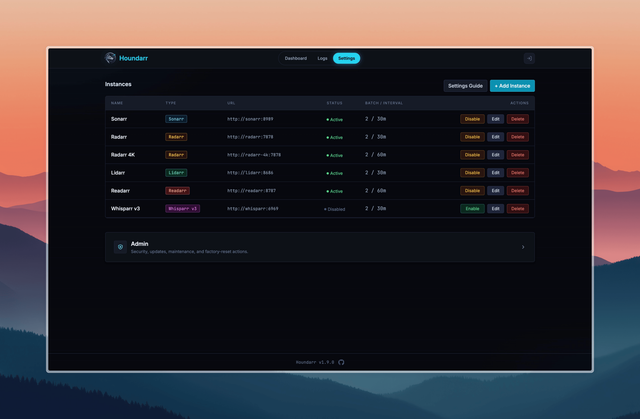
Instance enabled / disabled state is controlled from the row toggle in Settings. New instances are created as enabled by default.
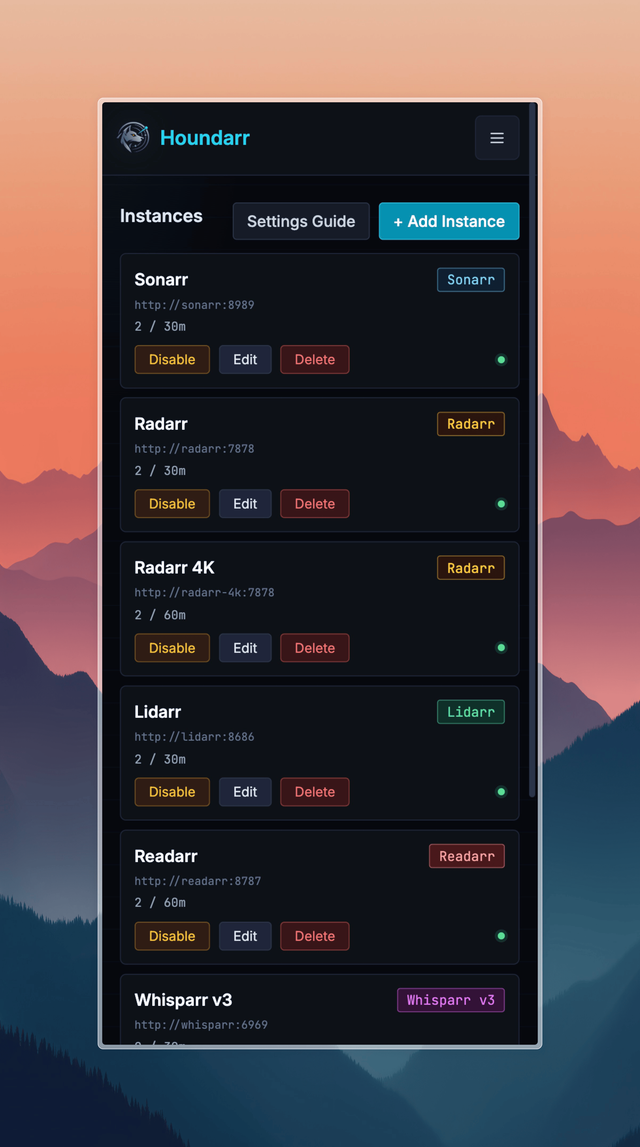
Same list on a phone-width viewport; each row keeps its own Disable / Edit / Delete controls.