Your First Search Cycle
This tutorial walks through the first 30 minutes with Houndarr: add a Sonarr or Radarr instance, run a search on demand, and read the log output. The goal is not to finish configuration. The goal is to see one cycle happen and learn what the log rows mean.
Prerequisites
Before you start, confirm:
- Houndarr is running. Follow Quick Start or Install on Unraid if not.
- You have at least one *arr instance reachable from the Houndarr host. Sonarr and Radarr are the most common; any of the six supported types work (Sonarr, Radarr, Lidarr, Readarr, Whisparr v2, Whisparr v3).
- The *arr instance has at least one monitored item on its wanted list. If you are brand new to *arr, the Servarr Sonarr quick-start guide walks you through getting Sonarr running with one series. Budget 15 to 30 minutes for that detour.
- An admin account is created on Houndarr. See First-Run Setup if the browser still shows the setup screen.
Step 1: add your *arr instance
In the Houndarr top navigation, click Settings.
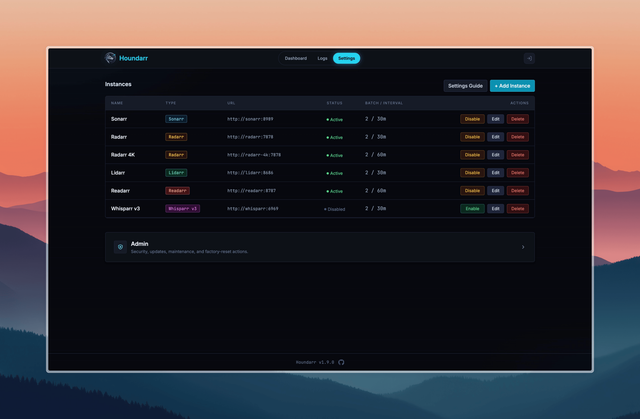
Click + Add Instance in the top right. Fill in the form:
- Name: anything descriptive. "Radarr Movies" or "Sonarr 4K" are fine.
- Type: pick the *arr app type. Radarr for movies, Sonarr for TV episodes, and so on.
- URL: the base URL of your instance. In a Docker Compose
stack this is usually the container service name plus the
instance's internal port:
http://sonarr:8989,http://radarr:7878. Notlocalhost. - API Key: copy from your *arr instance. In Sonarr or Radarr, go to Settings > General and find the API Key field.
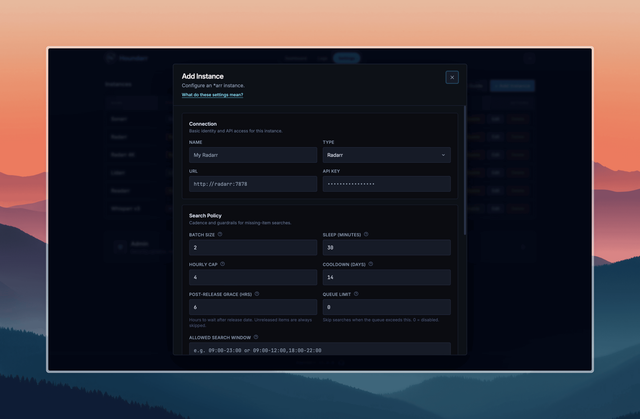
Leave every Search Policy field at its default for now. This is a first cycle, not a tuning run.
Click Save. Houndarr does a connection check against the *arr API. On success, the new row appears in the Instances table with a green Active dot.
Step 2: trigger the first cycle
Click Dashboard in the top navigation.
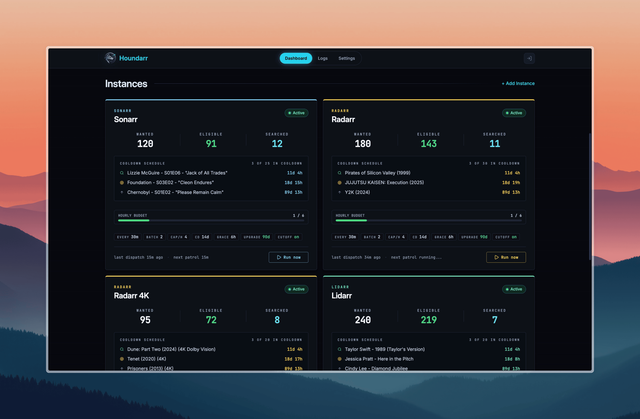
Find the card for the instance you just added and click Run
Now. This bypasses the Sleep (minutes) schedule and starts a
cycle immediately. The button flips through Running then Queued for
a few seconds while the engine probes the wanted list, picks
candidates, and decides who to search.
Step 3: read the log
Click Logs in the top navigation. The first-cycle rows appear at the top of the table.
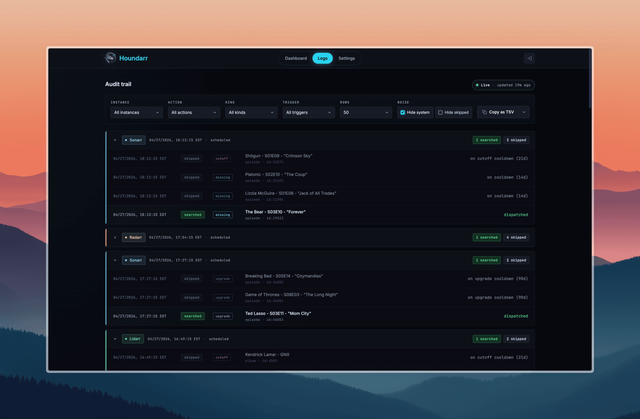
Look for the cycle group header for your instance. It shows an outcome label:
- outcome searched: at least one item was searched this cycle.
- outcome skips only: the cycle evaluated candidates but none were eligible right now. This is common on a first run against a wanted list where everything was imported around the same time.
Each individual row inside the cycle shows one evaluated item:
- An
action=searchedrow means a search command was sent to your *arr instance. Check your *arr's Activity or History tab; a matching grab attempt should be visible around the same timestamp. - An
action=skippedrow has a reason string likeon cooldown (Nd),not yet released, orpost-release grace (Nh). None of those mean anything is broken. See Skip Reasons for what each reason means and why skipping is normal.
If you see any action=error rows, the connection is the usual
culprit. See
Troubleshoot Connection
for common fixes: wrong API key, unreachable URL, published vs
internal port confusion.
What you have now
- An instance wired to Houndarr, running on the default schedule (batch 2, cap 4 per hour, cooldown 14 days).
- One log cycle on file showing what a typical pass looks like.
- A feel for the difference between
searchedandskippedrows.
What to do next
The first cycle is the boring part. The more useful parts:
- Let Houndarr run for 24 hours. Come back to the Logs page. You should see 4 to 8 searched rows across the day per instance, plus many skips. That is pacing working as designed.
- Add any other *arr instances you want on the schedule. Each one gets its own budget.
- When you hit a plateau (cooldowns filling up, nothing new to search), tune throughput deliberately. The order of adjustments is in Increase Throughput.
- Read How Houndarr Works for the mental model of the whole search cycle.